
Vulnerability Scanning
How Often Should You Perform a Vulnerability Scan? The Complete Frequency Guide
Scan internal systems at least monthly and internet-facing systems weekly or more, plus after major changes. Most frameworks expect a risk-based schedule.
Determining how often you should perform a vulnerability scan requires separating regulatory minimums from operational reality. For years, the default answer was "at least once a quarter." Today, waiting 90 days between scans leaves long blind spots across cloud workloads, remote endpoints and internet-facing systems.
Some standards, including PCI DSS, prescribe vulnerability scanning intervals for the systems they cover. Others, including HIPAA, ISO/IEC 27001 and the base NIST RA-5 control, require you to set and justify your own frequency based on risk. Either way, a quarterly scan rarely keeps pace with how quickly attackers move.
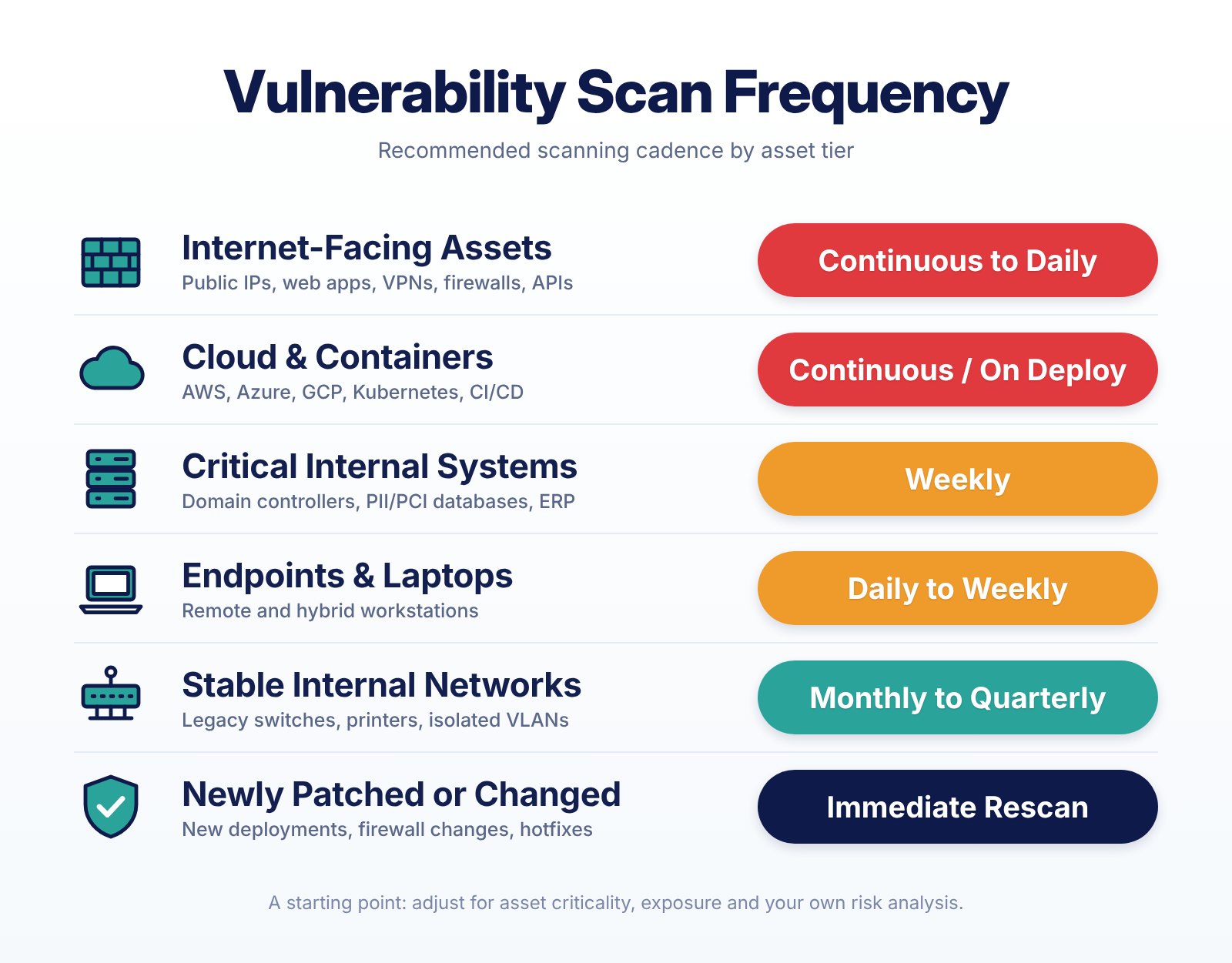
The table below is the cadence we recommend as a starting point. The rest of this guide explains how to adjust it for your environment and your compliance obligations.
Quick Answer: Recommended Vulnerability Scanning Frequency by Asset Tier
Rather than applying a single, one-size-fits-all schedule across your entire network, mature security teams align their scanning cadence with asset criticality and exposure. Use this reference matrix as a starting point for your program:
Asset Tier / Environment Type | Recommended Scan Frequency | Best Scanning Method | Primary Driver |
Internet-Facing Assets (Public IPs, web apps, VPNs, firewalls, APIs) | Continuous to Daily | External unauthenticated scan + EASM (External Attack Surface Management) | Automated botnets probe public assets for newly disclosed CVEs within hours. |
Cloud & Container Workloads (AWS/Azure/GCP, Kubernetes, CI/CD pipelines) | Continuous / Upon Deployment | Agentless cloud snapshot scanning + CI/CD pre-build image scanning | Ephemeral workloads spin up and down in minutes, bypassing scheduled scans. |
Critical Internal Systems (Domain controllers, databases with PII/PCI, ERP servers) | Weekly | Authenticated (credentialed) network scan or lightweight local agent | Minimizes lateral movement risk and protects high-value data repositories. |
Standard Endpoints & Laptops (Remote and hybrid employee workstations) | Daily to Weekly | Lightweight endpoint agent | Nomadic laptops frequently disconnect from corporate VPNs and miss network scans. |
Stable Internal Networks (Legacy switches, printers, isolated non-critical VLANs) | Monthly to Quarterly | Scheduled internal network scan | Low configuration churn and restricted network segmentation reduce urgency. |
Modified or Newly Patched Systems (New deployments, firewall rule changes, hotfixes) | Event-Triggered (Immediate) | Targeted authenticated rescan | Verifies that patches succeeded and changes introduced no new misconfigurations. |
Why Quarterly Scanning Is No Longer Enough: The Exposure Window Math
To see why quarterly scanning falls short, look at the time between a vulnerability appearing in your environment and it being fixed.
The 2026 Verizon Data Breach Investigations Report puts the median time-to-patch at 43 days, up from 32 days the year before, according to Tenable's summary of the findings. That clock only starts once someone knows the vulnerability is there.
A simplified model shows the effect of scan frequency. It assumes vulnerabilities appear at random times between scans, the scanner has a check for them, and the affected asset is reachable and in scope:
The detection delay: On a 90-day cycle, a new vulnerability waits about 45 days on average before the next scan finds it. On a weekly cycle, the average wait falls to about 3.5 days, before allowing for scan completion, alerting and triage.
The total exposure window: Add a median 43-day patch time, and quarterly scanning leaves a typical vulnerability exposed for roughly 88 days. Weekly scanning brings that closer to 47 days, and patching the most urgent findings faster shortens it further.
Attacker velocity: Mandiant found that the average time-to-exploit fell to 5 days in 2023, down from 32 days in 2021–2022, and that most vulnerabilities exploited in its sample were exploited before a patch was available.
Moving from quarterly to weekly scanning, or adding agent-based detection, does not eliminate the detection delay. It does cut it from weeks to days, which gives your team a realistic chance to patch the most urgent issues before they are exploited.
What "Continuous" Scanning Actually Means
Vendors, including us, use "continuous" loosely. Before you rely on it, ask what is actually happening and how often:
Asset inventory: how often the list of devices, cloud resources and installed software is refreshed.
Vulnerability intelligence: how often the scanner's checks and vulnerability data are updated.
Reassessment: how quickly the platform re-checks your existing inventory against newly published vulnerabilities.
Active scans: how often network or authenticated scans actually probe your systems.
Alerting: how quickly a finding reaches someone who can act on it.
These are different things. An agent that matches installed software against vulnerability intelligence, like the vulnerability detection in the SecureTrust SIEM platform, can flag a newly published vulnerability on a laptop without waiting for the next network scan. It is not a substitute for authenticated network scanning, web application testing or a PCI ASV scan, each of which finds different problems.
5 Core Factors That Dictate Your Vulnerability Scanning Schedule
Every organization operates with different risk tolerances, staffing levels, and technical architectures. When designing your vulnerability management policy, evaluate these five operational factors.
1. Asset Criticality and Data Sensitivity
You cannot protect what you have not inventoried. Effective vulnerability management begins with asset discovery and risk categorization. Systems that store, process or transmit high-value data, such as cardholder data (CHD), protected health information (PHI), Social Security numbers or proprietary source code, warrant more frequent scanning. We recommend at least weekly internal scanning for them. Isolated guest Wi-Fi networks or staging sandboxes with synthetic data can usually follow a monthly schedule.
2. Environment Velocity (Cloud, Containers, and Ephemeral Workloads)
Traditional network scanners assume that IP addresses map to static servers. However, modern multi-cloud environments, serverless functions, and Kubernetes clusters spin up and tear down instances in minutes. If a developer deploys a misconfigured container that runs for six hours and terminates, a weekly or monthly network scan will never see it. High-velocity cloud environments need automated posture monitoring and vulnerability scanning built into the CI/CD pipeline, so issues are caught before code reaches production.
3. Scan Methodology: Agent-Based vs. Network-Based Scanning
Historically, IT teams resisted frequent scanning because active, unauthenticated network scans consumed bandwidth and occasionally crashed fragile legacy systems or operational technology (OT) devices. Most programs now combine three approaches, each with its own resource, cost, permission and coverage trade-offs:
Endpoint agents: Installed on servers and workstations, agents check package versions and configuration locally and report results on a schedule. Their impact is typically lower than active network scanning, depending on the product, configuration and workload, so test them on representative systems before rolling out widely.
Agentless cloud connectors: Reading cloud provider APIs and taking read-only snapshots of virtual machine disks lets teams assess cloud workloads frequently, usually with little effect on running instances. Snapshots and API calls can add cost and need appropriate permissions.
Active network scanners: Still needed to discover unmanaged devices (shadow IT), IoT hardware, network switches and external perimeter ports where agents cannot be installed. Run external active scans daily to weekly, and internal active discovery scans weekly to monthly during off-peak windows.
Healthcare and OT note: Coordinate active scans of medical devices, OT and other sensitive systems with the device owner and vendor. Use passive monitoring or vendor-approved methods where active scanning could disrupt operations.
4. Major Infrastructure Changes, Patch Verification, and Newly Exploited Vulnerabilities
Calendar-based scanning must always be supplemented by event-triggered scanning. Start a targeted vulnerability check whenever any of the following occur:
Major Infrastructure Changes: Deploying a new CRM, migrating email providers, reconfiguring firewall rules, or opening new network ports.
Post-Patch Verification (Confirmation Scans): Applying a software patch or hotfix can take anywhere from a few hours to two weeks depending on change-control testing. Always run a follow-up scan using the same scan configuration after patching to verify that the remediation succeeded and that no regression occurred.
Newly disclosed or actively exploited vulnerabilities: When a vendor advisory, a CISA Known Exploited Vulnerabilities (KEV) entry or credible threat intelligence identifies a vulnerability that may affect your environment, promptly determine your exposure and run targeted detection where your tools support it. A KEV entry means the vulnerability is known to have been exploited; it is not necessarily a zero-day. Your scanner may not yet have a check for a newly disclosed flaw, so use the vendor's guidance and search your asset inventory for affected products and versions in the meantime.
5. Internal Remediation Capacity and MTTR Alignment
Scanning without remediation merely generates shelfware reports. If your IT operations team takes 30 days to triage and patch findings from a monthly scan, running full unprioritized network scans every single day will only cause alert fatigue. Align your reporting cadence with your remediation capacity: use automated detection to send real-time alerts for critical, actively exploited flaws to your security operations team, while batching medium- and low-severity findings into weekly or bi-weekly sprint tickets for system administrators. If patching is the bottleneck, see our guide to managed patch management, SLAs and choosing an MSP.
Vulnerability Scanning Frequency by Compliance Framework
Compliance should never be your only security driver, but missing a required scanning interval can lead to audit findings and penalties. Requirements depend on your scope, your contracts and the current version of each framework, so confirm the details against the source text. Here is what the major frameworks say:
PCI DSS v4.0.1 (Requirement 11.3)
PCI DSS generally requires internal and external vulnerability scans at least once every three months and after significant changes, for systems in scope of the cardholder data environment (CDE). The scanning requirements sit in PCI DSS Requirement 11:
Internal scans (Req. 11.3.1): At least once every three months. High-risk and critical vulnerabilities, as ranked under your own risk rankings (Requirement 6.3.1), must be resolved and confirmed with rescans. Qualified internal personnel with organizational independence can perform these scans; an external vendor is not required.
Authenticated internal scanning (Req. 11.3.1.2): Internal scans must use authenticated (credentialed) scanning with sufficient privileges, and systems that cannot accept credentials must be documented.
Lower-risk findings (Req. 11.3.1.1): Vulnerabilities not ranked high-risk or critical must be addressed based on the risk defined in your targeted risk analysis, with rescans as needed. This requirement governs how you address those findings, not how often you scan.
External scans (Req. 11.3.2): At least once every three months, performed by a PCI SSC Approved Scanning Vendor (ASV). Findings and rescans must be handled under the ASV Program Guide requirements for a passing scan, including disputed findings, exceptions and compensating controls. A passing ASV scan does not by itself establish PCI DSS compliance.
Significant-change scans (Req. 11.3.1.3 & 11.3.2.1): Internal and external scans are also required after any significant change.
NIST SP 800-53 (Control RA-5), FedRAMP & CISA BOD 23-01
NIST SP 800-53 Rev. 5 (Control RA-5): The base control does not set a fixed calendar interval. RA-5 (Vulnerability Monitoring and Scanning) requires scanning at an organization-defined frequency and when new vulnerabilities potentially affecting the system are identified.
FedRAMP and FISMA: Federal systems take specific parameter values from the baseline and program that apply to them, and those values can change. If you operate under FedRAMP or an agency FISMA program, take your scanning frequency from the current requirements for your baseline rather than from a general guide.
CISA Binding Operational Directive (BOD) 23-01: For federal civilian executive branch (FCEB) agencies, and a useful benchmark for private organizations, CISA BOD 23-01 mandates automated asset discovery every 7 days and vulnerability enumeration across all discovered assets (including roaming laptops) at least every 14 days.
CMMC 2.0 & NIST SP 800-171
For Department of Defense (DoD) contractors subject to Cybersecurity Maturity Model Certification (CMMC) Level 2, the relevant practice is RA.L2-3.11.2, from NIST SP 800-171 (Requirement 3.11.2 in Rev. 2 / 03.11.02 in Rev. 3): scan for vulnerabilities in organizational systems and applications periodically and when new vulnerabilities affecting those systems are identified. It does not set a single cadence. Check the cybersecurity requirements in your contract and the current CMMC program rules, then define and document a risk-based scanning frequency, explain how it covers the systems in scope, and keep evidence that scans, remediation and verification happen as scheduled.
ISO/IEC 27001 & HIPAA Security Rule
ISO/IEC 27001 (Annex A control 8.8, Management of Technical Vulnerabilities): Requires organizations to obtain timely information about technical vulnerabilities, evaluate their exposure and take appropriate measures. The standard does not set a scanning interval. Define and document a risk-based frequency, explain how it covers the systems in scope, and keep evidence that scans, remediation and verification happen as scheduled.
HIPAA Security Rule: HIPAA does not prescribe a universal monthly or quarterly vulnerability scanning schedule. Covered entities and business associates must conduct an accurate and thorough risk analysis (45 CFR § 164.308(a)(1)(ii)(A)) and periodically evaluate their security safeguards (§ 164.308(a)(8)). As a starting point, SecureTrust recommends that healthcare organizations consider weekly external scanning and at least monthly authenticated internal scanning, adjusted for asset criticality, exposure, device limitations and the organization's risk analysis. Our HIPAA page shows how these safeguards map to the platform.
Example: Scanning a Small Medical or Dental Practice
Here is how the tiers apply to a typical ten-person clinic, and who is responsible for each part:
Front-desk and clinical laptops (endpoints): An endpoint agent reports missing patches daily. Whoever manages the practice's IT, in-house or a managed provider, reviews the findings and applies patches.
The internet-facing firewall and remote access (internet-facing): Weekly external scans, plus an immediate check when the firewall vendor publishes an advisory. The practice's IT provider owns this and keeps firmware current.
The cloud-hosted EHR or practice management system: The vendor scans and patches its own platform under its business associate agreement. The practice should ask for evidence of the vendor's vulnerability management, and remains responsible for its own user accounts and devices.
An imaging or X-ray workstation the vendor does not allow to be actively scanned: Passive monitoring, network segmentation and vendor-supplied patches instead. Responsibility is shared with the device vendor, and the exception belongs in the risk analysis.
Writing down who owns each tier closes the most common gap: everyone assuming someone else is scanning. Our healthcare security page and ClinicProof cover how we help practices keep that evidence current.
How to Build a Tiered Vulnerability Scanning Schedule (Step-by-Step)
To move from quarterly checks to a risk-based scanning program without overwhelming your network or staff, follow these five steps. Use the table above for the cadence of each tier.
Automate Asset Discovery: Configure passive network monitoring, cloud API connectors, and DHCP/Active Directory integrations to update your asset inventory at least every 7 days. You cannot scan shadow IT or ephemeral cloud instances if you do not know they exist.
Deploy Authenticated Agents on Endpoints and Core Servers: Install lightweight scanning agents across Windows, Linux, and macOS endpoints and core production servers, and set them to report vulnerability data daily. Use credentialed (authenticated) scans wherever possible so the scanner can inspect local patch levels and configurations directly, which greatly reduces false positives compared to unauthenticated port probing.
Schedule External and Internal Network Scans: Point an external scanner at all public-facing IPs, domains, and VPN gateways, and schedule internal active scans for unmanaged devices like printers, switches, firewalls, and IoT sensors. Run internal scans off-peak, and coordinate or exclude sensitive medical and OT devices as described above.
Integrate Pre-Deployment Scans into CI/CD Change Management: Add automated Software Composition Analysis (SCA) and container image scanning directly into your developer build pipelines. Make passing a post-deployment vulnerability scan a mandatory gate in your IT change-management checklist before closing any infrastructure upgrade ticket.
Prioritize by Exploitability and Run Verification Rescans: Instead of treating every CVE equally, combine CVSS severity with the Exploit Prediction Scoring System (EPSS) and the CISA KEV catalog, and weigh internet exposure, asset importance and available mitigations. Fix vulnerabilities that are known to be exploited, or likely to be, before working down CVSS scores alone. Once a patch is applied, trigger a confirmation rescan within 24 hours to verify closure.
Frequently Asked Questions (FAQs)
Is quarterly vulnerability scanning enough for small businesses?
Usually not. Quarterly scanning meets some specific requirements, such as PCI DSS, but automated attacks against small business firewalls and VPN appliances run around the clock. For most small organizations, we recommend starting with weekly external scans and at least monthly internal scans, then adjusting using the table above.
What is the difference between a vulnerability scan and a penetration test?
A vulnerability scan is an automated, high-frequency check that compares your systems against a database of known security flaws, missing patches, and misconfigurations (conducted continuously, weekly, or monthly). A penetration test is a manual, goal-oriented simulated cyberattack performed by an ethical hacker to chain vulnerabilities together and test business logic flaws (typically conducted annually or after major architectural changes).
Should vulnerability scans be authenticated or unauthenticated?
You need both, run on different schedules. Unauthenticated scans view your network from an outsider's perspective and should run daily to weekly against your external perimeter to spot exposed ports and services. Authenticated (credentialed) scans log into systems using privileged read-only credentials (or local agents) to audit exact software versions and missing OS patches; these should run weekly to monthly internally to provide deep visibility with fewer false positives.
Not sure whether your clinic is scanning the right systems? Schedule a vulnerability management review with SecureTrust Cyber.